I Turned IBM's AI Periodic Table Video Into an Interactive Tool
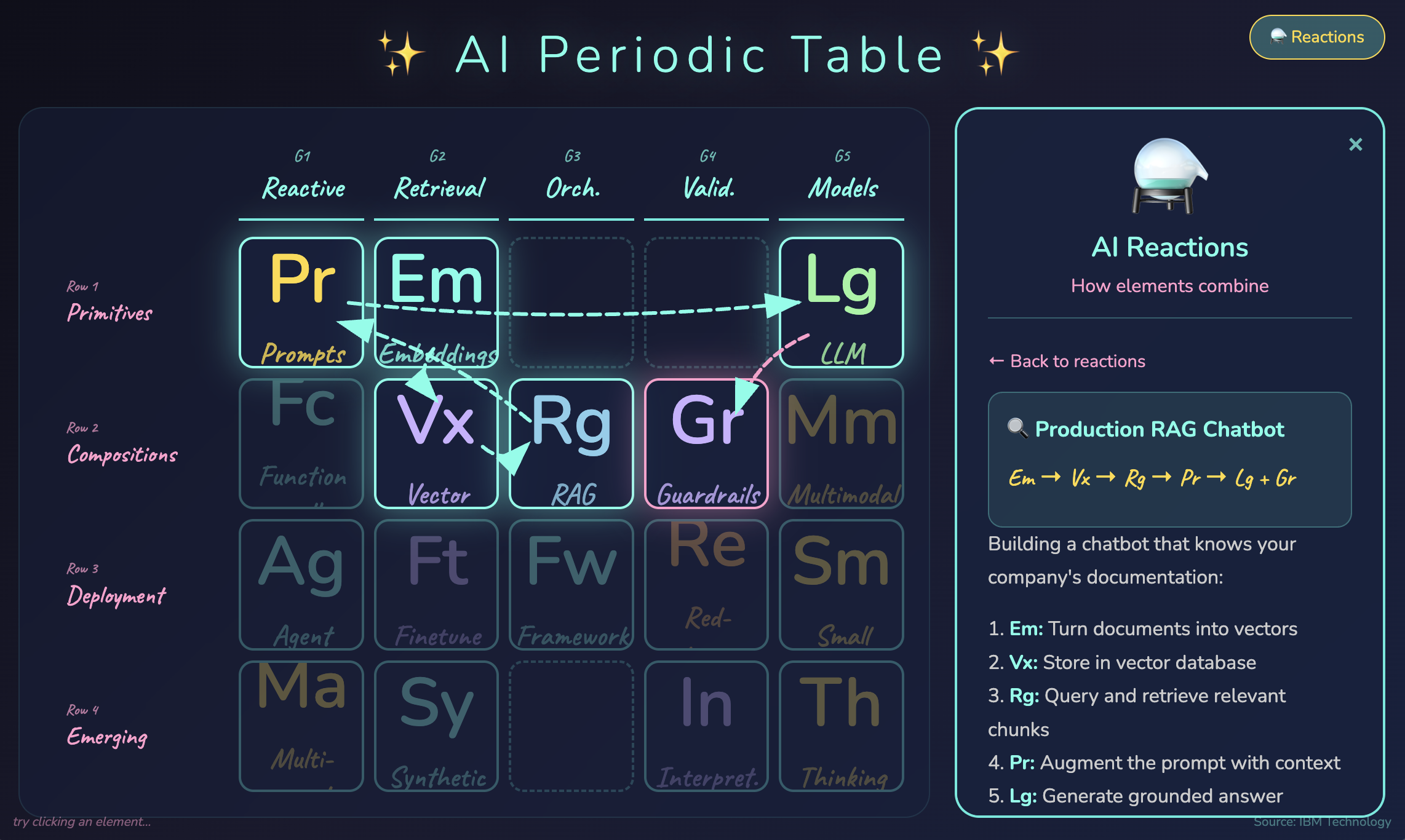
Does the world of AI feel like alphabet soup to you? RAG, LLM, embeddings, agents, guardrails, fine-tuning… everyone throws these terms around like you’re supposed to just know how they all fit together.
I stumbled on an IBM Technology video⇗ that organizes all of AI into a periodic table — with families, periods, and even “chemical reactions” showing how components combine.
Then I thought: why just watch when I can build?
Try It Yourself
Click any element to see its details. Hit the flask icon to see how AI architectures combine!
The Structure
The table organizes AI concepts into 5 families (columns) and 4 periods (rows):
Families (What They Do)
| Family | Name | Behavior |
|---|---|---|
| 🟡 G1 | Reactive | Small changes → completely different outputs |
| 🔵 G2 | Retrieval | Search, storage, and memory |
| 🟣 G3 | Orchestration | Combining multiple elements together |
| 🔴 G4 | Validation | Safety, testing, verification |
| 🟢 G5 | Models | Stable foundational capabilities |
Periods (Complexity Level)
| Row | Name | Description |
|---|---|---|
| 1 | Primitives | Atomic building blocks (Prompts, Embeddings, LLMs) |
| 2 | Compositions | Primitives combined (RAG, Vector DBs, Guardrails) |
| 3 | Deployment | Production patterns (Agents, Frameworks, Fine-tuning) |
| 4 | Emerging | Cutting edge (Multi-Agent, Thinking Models, Interpretability) |
The Killer Feature: Reactions
Here’s what makes the periodic table metaphor brilliant — and what I made interactive.
In chemistry, elements combine in predictable ways. AI components do too.
Reaction #1: Production RAG Chatbot
Em → Vx → Rg → Pr → Lg + Gr
Translation:
- Em (Embeddings): Turn your documents into vectors
- Vx (Vector DB): Store them for semantic search
- Rg (RAG): Retrieve relevant chunks when user asks a question
- Pr (Prompt): Augment the prompt with retrieved context
- Lg (LLM): Generate an answer grounded in your data
- Gr (Guardrails): Wrap in safety filters
Click the flask icon in the tool above, select “Production RAG Chatbot,” and watch the reaction path draw itself across the table.
Reaction #2: Agentic Loop
Ag ←→ Fc → [External APIs]
     ↓
    Fw
The Agent thinks, acts (via Function Calling), observes results, and loops — all coordinated by a Framework.
Why Build It?
Three reasons:
- Learning by building — I understand RAG architecture way better after wiring up those animated paths
- Reference tool — Now I can quickly look up “wait, what’s the difference between fine-tuning and RAG?”
- Shareable — Next time someone asks me to explain AI architecture, I just send them here
The Challenge
Next time someone pitches you an AI product, map it to this table:
- What elements are they using?
- What reactions are they running?
- Are they missing safety elements (Gr, Re)?
- Are they over-engineering the orchestration?
- Are they using a thinking model when a small model would do?
It’s all right here — a framework to decode any AI architecture.
Original concept from IBM Technology⇗. Interactive implementation by me.
If you liked this post, you can share it with your followers⇗ and/or follow me on Twitter!